
Quick and easy
Patient portal login.
Log in to your patient portal here! 🗝 With the patient portal you can quickly and easily contact your general practitioner (huisarts), make an appointment and view your medical record. No waiting on the phone, view your own details and ask your questions easily. Really nice! 👌
Log in

What can you do in the patient portal?
The patient portal is a safe, easy and fast place to get in touch with your general practitioner. But what exactly can you do with it? We are happy to list it clearly for you. 👌
-
Make your own appointments
No more waiting on the phone! You choose the type of appointment you need yourself. That way we can plan the right length straight away. Some appointments simply need a little more attention than others.
-
Request repeat medication
Through the portal you order your repeat medication with one click. Your request goes straight to our doctors. We aim to review your medication within one working day. Nice and clear.
-
An e-consult for all your questions
Do you have a medical question? Feel free to ask it online. We read along and answer as soon as possible. Sometimes that is just as handy as coming by.
-
Video call with your general practitioner
A video call saves travel time and works surprisingly well. A physical examination remains difficult of course, but our doctors are real digital heroes 😎
You start your video call appointment easily through a link in the portal. It opens in Microsoft Teams, in the app or simply in your browser. -
View lab results
Had a blood test or another examination? As soon as the results are in, you can view them yourself in the portal. So you do not have to wait for a phone call and you know right away where you stand.
-
View your medical details
In the portal you can easily view your own medical details. Very handy if you want to look something up or want to check how things were again. Everything is neatly in one place.
Frequently asked questions.
Who can use the patient portal?
You can use the Fonkelzorg patient portal if you:
- are registered as a patient with a Fonkelzorg general practice
- have a computer, tablet or smartphone with an internet connection
- have a DigiD with extra verification by SMS or the DigiD app
How does logging in to the portal work?
Click ‘Patient portal’ or go to mijn.fonkelzorg.nl. There you choose how you want to log in:
- With DigiD.
- Or as an authorized representative (for example if you have permission to log in for your father, mother or child).
After logging in you arrive at the welcome page. At the top you see a menu. There you can:
- Make, change or cancel appointments.
- Ask a medical question through an e-consult
- Request repeat prescriptions.
- View your record, results, (referral) letters and medical details.
This way you always have safe and easy access to your care information.
PLEASE NOTE:
As a parent you can apply for a separate DigiD for children under 14. That is handy, because the questions / photos you send us about your child then go straight into the right record. This way we can help you fastest and we prevent information about your child from ending up in your own record. On top of that, with a DigiD for your child you can also schedule appointments through the patient portal, so you no longer have to call us about this. Not only we, but also many hospitals and the GGD use DigiD to view your record or to make appointments. You can apply for a DigiD for your child quickly and easily at DigiD.nl.
What can I do in the patient portal?
With the patient portal you can view your medical record directly and you can:
- Schedule appointments yourself
- Request repeat prescriptions
- Ask a question through an e-consult
- Make a video call
- View lab results
- View your medical details
- View letters
How do I request a repeat prescription through the portal?
Requesting a repeat prescription through our patient portal is easy ✔️.
Follow these steps:
- Log in to the patient portal with your DigiD 🔐.
- Go to the ‘Medicijnen’ (medicines) section at the top of the page.
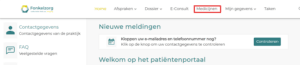
- Tick the medicine you want to repeat. PLEASE NOTE: This is not possible with all medicines. Some medicines have to be requested through an e-consult because they can be addictive or for other reasons.
In the example below you cannot click oxazepam, for instance, but you can click Paracetamol.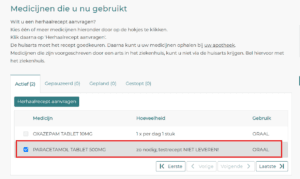 4. Check that everything is correct and then click 'Herhaalrecept aanvragen' (request repeat prescription).
5. You will receive a confirmation as soon as your request has been processed.
⏱️ Please allow 1 to 2 business days for processing.
The pharmacy will let you know when your medication is ready. So you can ask them about this.
Please note
- You can only repeat medicines that we have prescribed for you before.
- Sleep medication, calming medication, strong painkillers and certain medication for mental health problems can be repeated only through an e-consult or by phone.
- Has something changed in your health or are you unsure whether you should still use the medicine? Then contact us. 🩺
What information should I give in an e-consult?
When you send an e-consult, it helps if you give us as much information as possible right away. So please describe the following clearly:
-
What exactly is your question, or what do you want us to find out for you?
-
What have you already tried yourself to relieve the symptoms?
-
Are there other symptoms that may be related to your question?
With your extra information we can better assess what is going on and give you fitting advice as soon as possible. 😍
You usually get an answer within 3 business days. Do you need help sooner? Then call the practice.
Can I ask a question about my child through the patient portal?
As a parent you can apply for a separate DigiD for children under 14. That is handy, because the questions / photos you send us about your child then go straight into the right record. This way we can help you fastest and we prevent information about your child from ending up in your own record.
On top of that, with a DigiD for your child you can also schedule appointments through the patient portal, so you no longer have to call us about this. Not only we, but also many hospitals and the GGD use DigiD to view your record or to make appointments. You can apply for a DigiD for your child quickly and easily at DigiD.nl.
Can I log in to someone else's patient portal (as an authorized representative)?
If you are authorized as the ‘legal representative’ of a patient, you can look in the patient portal and arrange things on behalf of the patient.